
Your PSP games
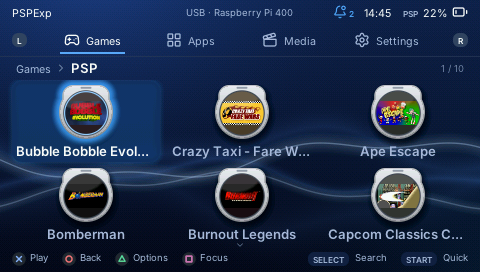
Keep your PSP games on the board and play them on the PSP, no copying to the memory stick. They show up in the launcher's PSP section, each with its own icon. Choose one and the PSP runs it itself, at its own speed, reading the game's disc from the board over the USB cable. Leave the game and you are back in PSPExp.
What you need
- A PSP with PRO custom firmware (tested on a PSP-1000 with 6.60 PRO-C; ARK has not been tried yet).
- PSPExp up to date on the board (Apps > Packages) and on the PSP (Settings > Update PSP, when the launcher offers it).
- The PSPExp plugin switched on, once: Settings > PSP > PSPExp plugin, cross (more about the plugin).
- Your own PSP games as ISO or CSO files, or a zip holding one.
Quick start
- Copy your games into the
roms/pspfolder of the board's home folder (on a Raspberry Pi,/home/pi/roms/psp): with Apps > Files from a USB stick plugged into the board, for example. - In Games, choose PSP in the list of platforms and press cross.
- Choose a game and press cross. PSPExp hands the PSP over and the game starts as from the XMB.
- To come back, press HOME and choose Exit Game: PSPExp starts again by itself.
A zipped game is unpacked once on the board the first time you start it (the launcher shows "Preparing" with its progress). The board keeps a few unpacked games and removes the oldest when it needs the room.
Good to know
- Speed: the games start as fast as from the memory stick and play the same. Only a loading screen can take a moment longer.
- Recording works in these games too: ♪ + L (Recording your games).
- Keep the PSP plugged in. The game's disc is on the board: if the cable comes out while you play, the game waits until it is back. If the board is not there when a game starts, the PSP waits a minute and a half, then goes back to PSPExp.
- Saves are the PSP's own, on its memory stick, as for any game.
- PS1 games in the same folder are left out of the section for now.
- Tested so far: Ace Combat X, Bomberman, Burnout Legends, Despicable Me, Gran Turismo, Pro Evolution Soccer 2014.
If something does not work
- "Switch on the PSPExp plugin first": Settings > PSP > PSPExp plugin is Off. Turn it on and choose the game again.
- "PSP games need PSPExp on the PSP updated": Settings > Update PSP.
- The game stays on a black screen: check the cable and that the board is on; see the plugin's page.